


You published 10 blog posts last month.
But Google still does NOT understand what your website is all about.
Why? Because one post talks about email marketing, the next one is about WordPress hosting. Then there’s another post on an SEO guide that suddenly links to a coupon page.
Are you getting it? You publish a ton of posts on several random topics, without focusing on topical authority.
So when Google crawls your site, it gets confused: “What is this website actually about?”
That’s where SEO silo structure comes in.
It helps you group related content together so Google can clearly understand your main topics.
If done right, siloing can help both search engines and readers navigate your site easily.
But here’s the catch: strict silo structures can cause problems.
Most SEO guides don’t talk about them. In this guide, I’ll explain why that is and what you should do instead in 2026. Let’s get started.

What Is a Silo Structure in SEO?
Silo structure is a way to organize your website content by topic. You group related posts into a single category and interlink them. This helps Google clearly understand what each section of your site covers.
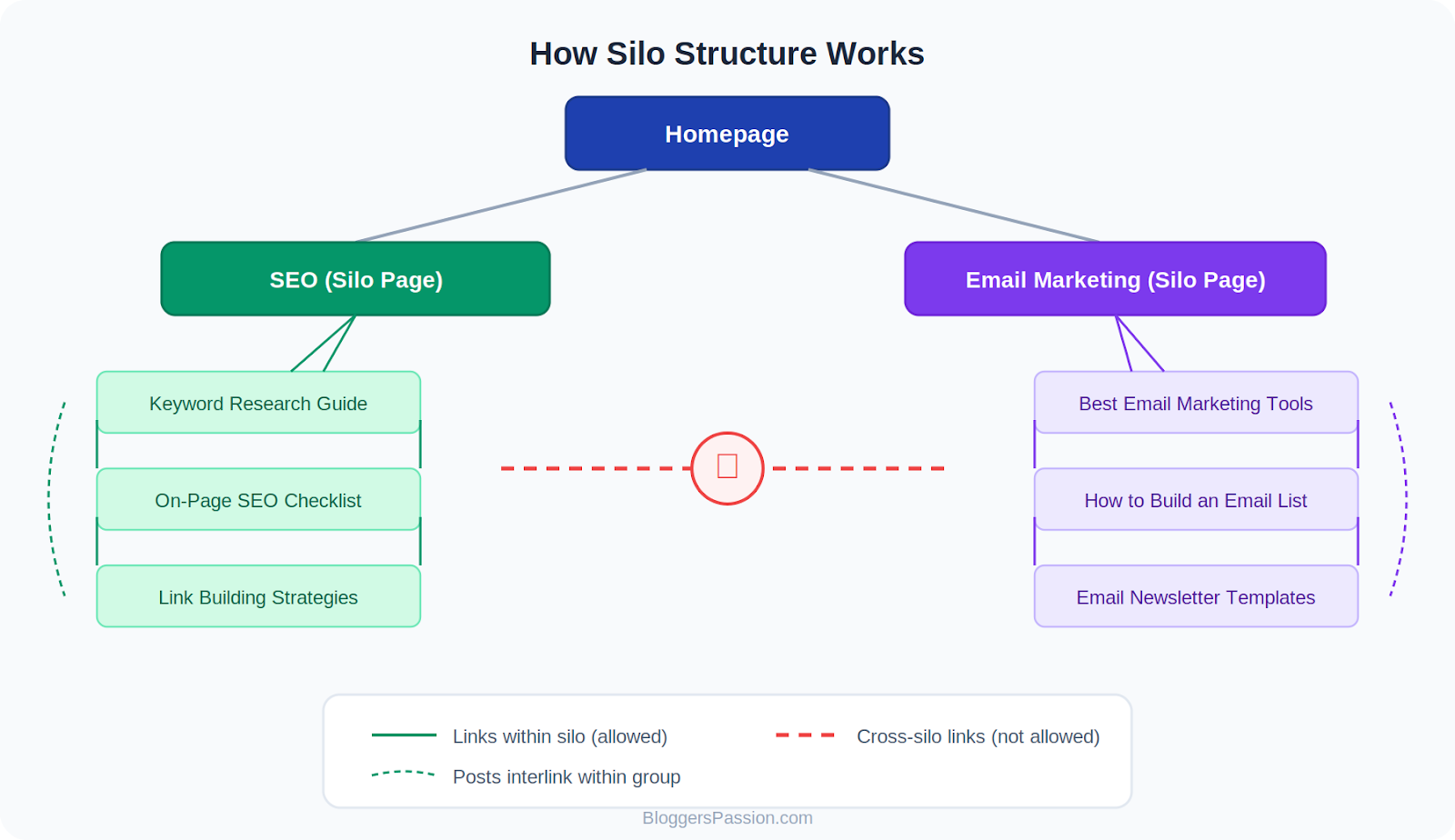
Say you run a digital marketing blog. Your silos might look like this:
SEO (silo page)
- Keyword Research Guide
- On-Page SEO Checklist
- Link Building Strategies
Email Marketing (silo page)
- Best Email Marketing Tools
- How to Build an Email List
- Email Newsletter Templates
Inside each silo, every post links to the other posts and back to the main silo page.
But here’s the key rule of strict siloing: Posts in one silo DO NOT link to posts in another silo.
Your keyword research post won’t link to an email marketing post. Your email tools guide won’t link to a link building article. Everything stays inside its own topic group.
That’s why it’s called a “silo”.
Here’s what an SEO silo usually looks like in practice:
3 Types of SEO Silos
Not all silos are built the same way. There are three types you should know about.
1. Physical Silos
This is where your URL structure reflects the silo. Your content is organized into folders and subfolders.
Example:
- yourdomain.com/seo/keyword-research/
- yourdomain.com/seo/link-building/
- yourdomain.com/email-marketing/email-tools/
The topic grouping is visible right in the URL. Google can see the hierarchy just by looking at the URL address.
2. Virtual Silos
Here, your URLs don’t show the silo. Instead, you create silos only through internal linking.
Example:
- yourdomain.com/keyword-research/
- yourdomain.com/link-building/
The URLs are flat. But your keyword research post links to your on-page SEO post, which links to your link building post. The silo exists only through links, not folders.
3. Hybrid Silos
This combines both. You use a folder-based URL structure AND strategic internal linking to reinforce each silo.
Most well-optimized WordPress sites use this approach. At BloggersPassion, we use categories in our URLs (physical silo) and interlink all posts within each category (virtual silo).
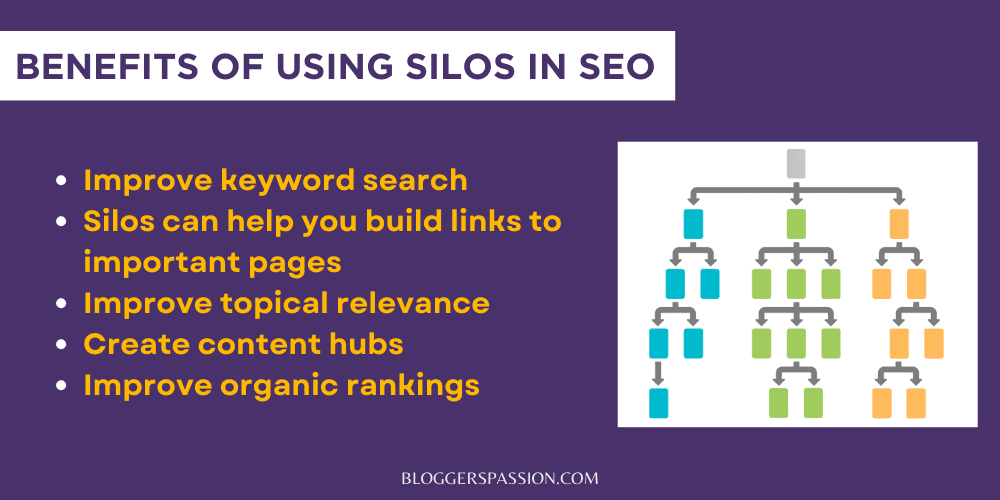
SEO Silo Structure Examples
Let’s look at some real sites using silos.
Example 1: BloggersPassion
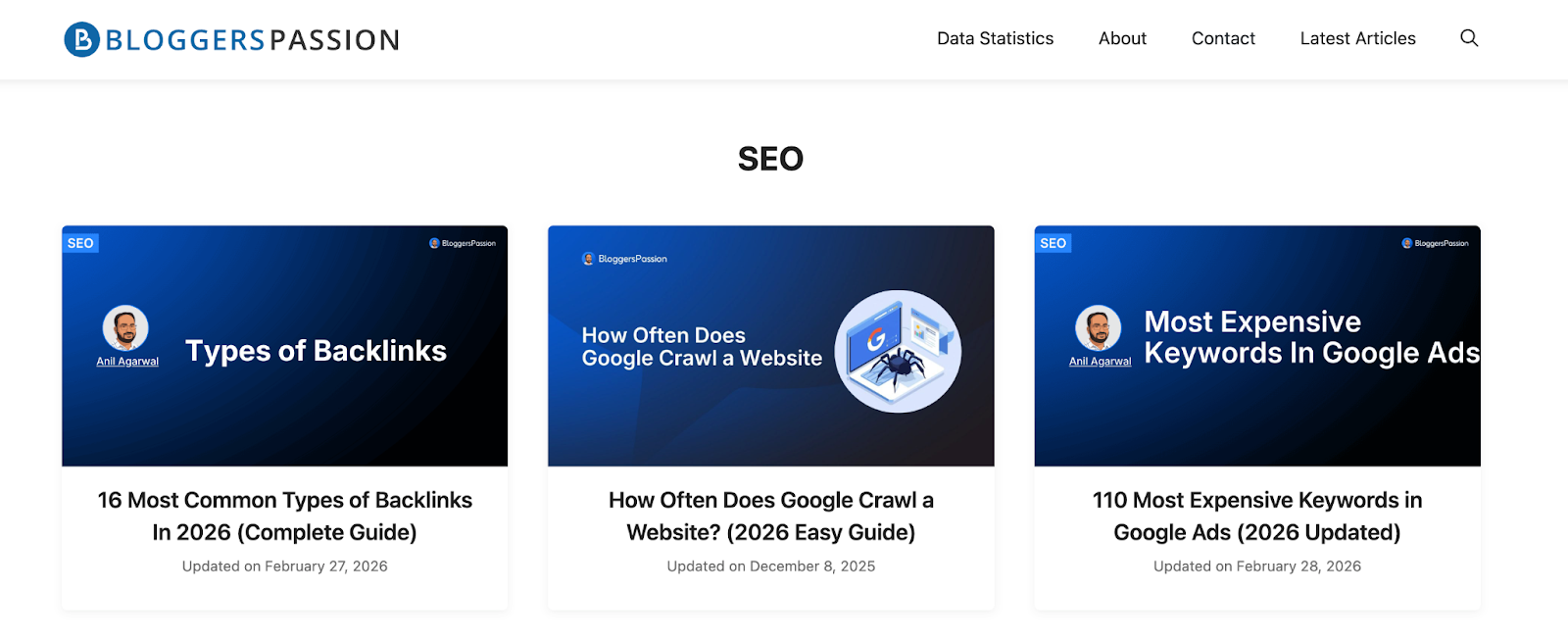
At BloggersPassion, we’ve built silos around our core topics: Blogging, SEO, Web Hosting, and more.
When someone clicks on the SEO category, they only see posts related to SEO. No blogging tips. No hosting reviews. Just pure SEO content. This keeps each silo clean and focused.
Example 2: Search Engine Land
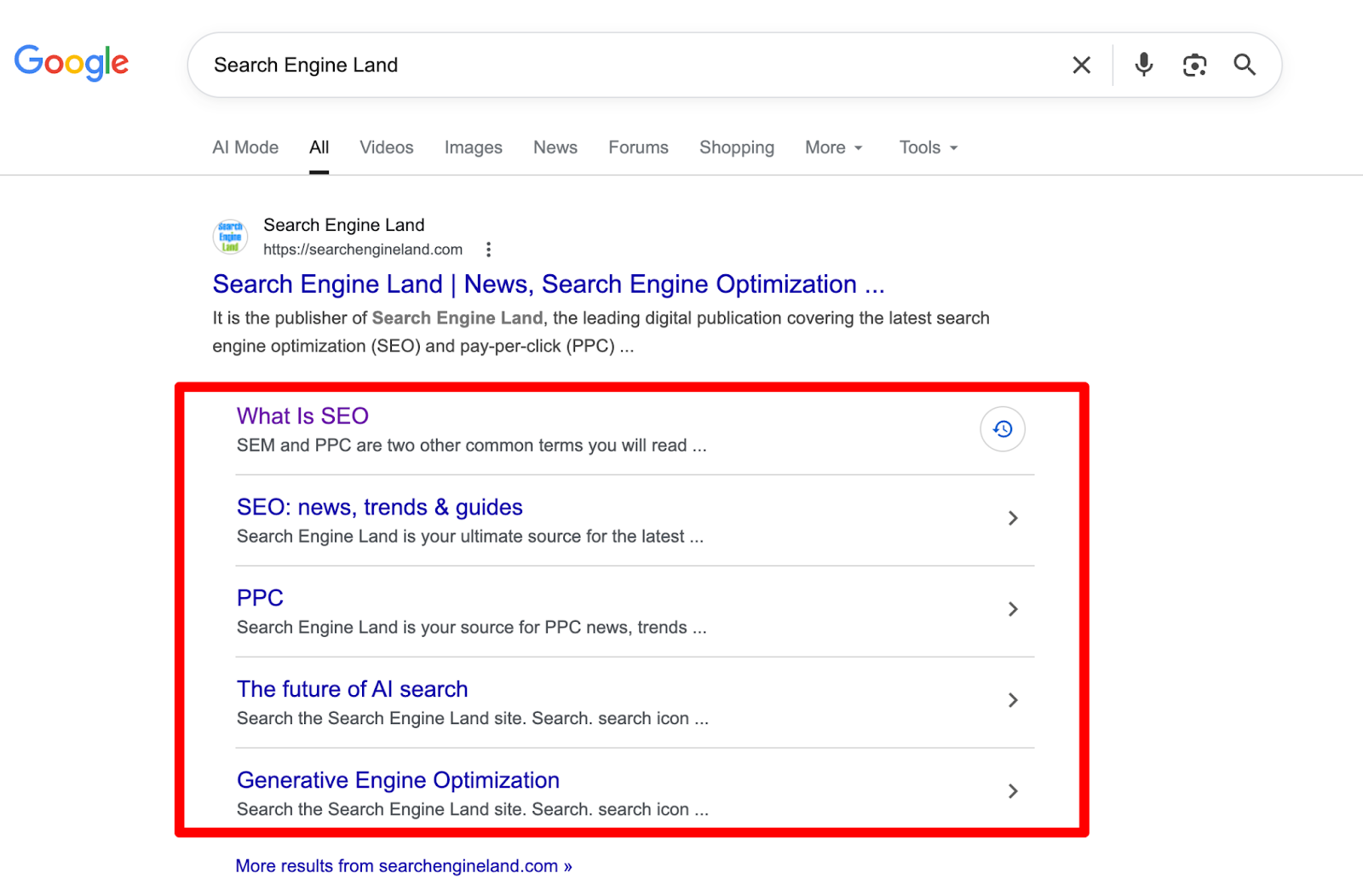
Search Engine Land uses silos for SEO, PPC, Social, and other digital marketing topics. Their structure is so clean that Google rewards them with sitelinks in search results. When you search “Search Engine Land,” you’ll see their silo categories displayed right below the main result.
The Problem With Strict Silos
Strict siloing means you NEVER link between silos. Silo structure sounds organized. But it causes real problems.
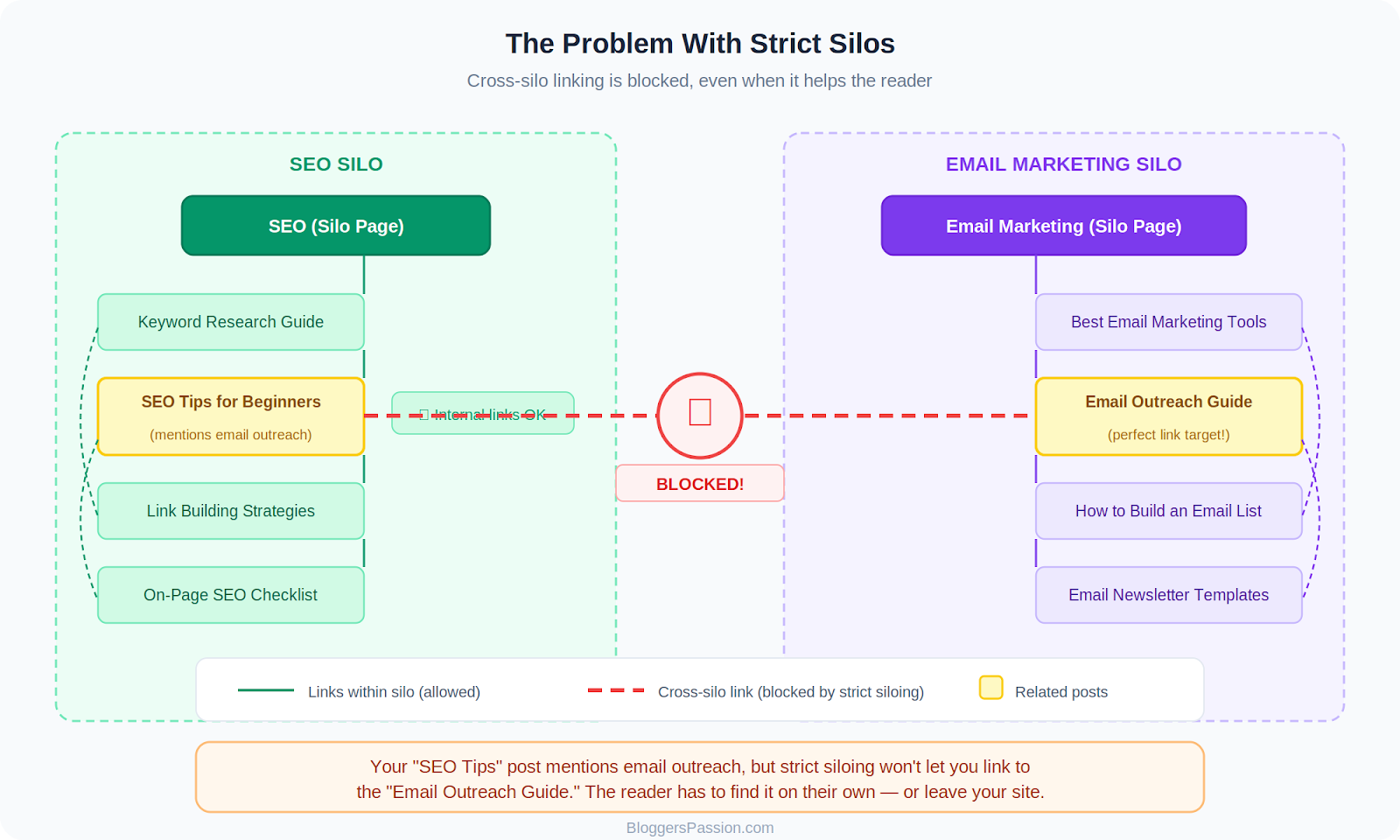
Let’s say you publish a blog post called “SEO Tips for Beginners” in your SEO silo.
In that post, you mention email outreach as a link building strategy.
And you already have a detailed “Email Outreach Guide” in your Email Marketing silo.
Naturally, you would want to link to it, as it helps the reader.
But strict silo rules say don’t do it. Because that link goes to a different silo. So you don’t link.
Now your reader has to search your site to find it. Or worse, they leave your site and read it on a competitor’s blog.
That’s bad for users AND bad for SEO.
Here are a few more issues with the strict siloing in SEO;
Orphan pages: Some posts don’t fit into a single silo. They end up with almost no internal links. Google can’t find them. They never rank.
Wasted link juice: If one silo gets lots of backlinks, that linking juice goes only in that silo. It doesn’t flow to other important pages on your site.
Even Google isn’t a fan: John Mueller has said that a pyramid-style structure with cross-linking helps Google better understand pages than completely isolated silos.
Watch this video to better understand it.
Silos vs. Topic Clusters: What’s the Difference?
If silos have issues, what’s the alternative? Topic clusters.
Both silos and topic clusters group content by topic. Both use a main page at the top with supporting posts underneath. Both use internal linking.
The difference? Topic clusters allow cross-linking. Silos don’t.
With topic clusters, your keyword research post CAN link to your email marketing guide if the context makes sense.
Topic clusters give you all the benefits of silos (clean structure, topical authority, good crawlability) without any linking restrictions.
For example, at BloggersPassion, we organize content into categories like SEO, Blogging, and Hosting. That’s our silo-like structure.
But if our post on SEO mistakes mentions choosing the wrong hosting provider, we link to our hosting guide.
That’s the topic cluster approach. You get a clean organization WITHOUT any linking rules. (Image Source)
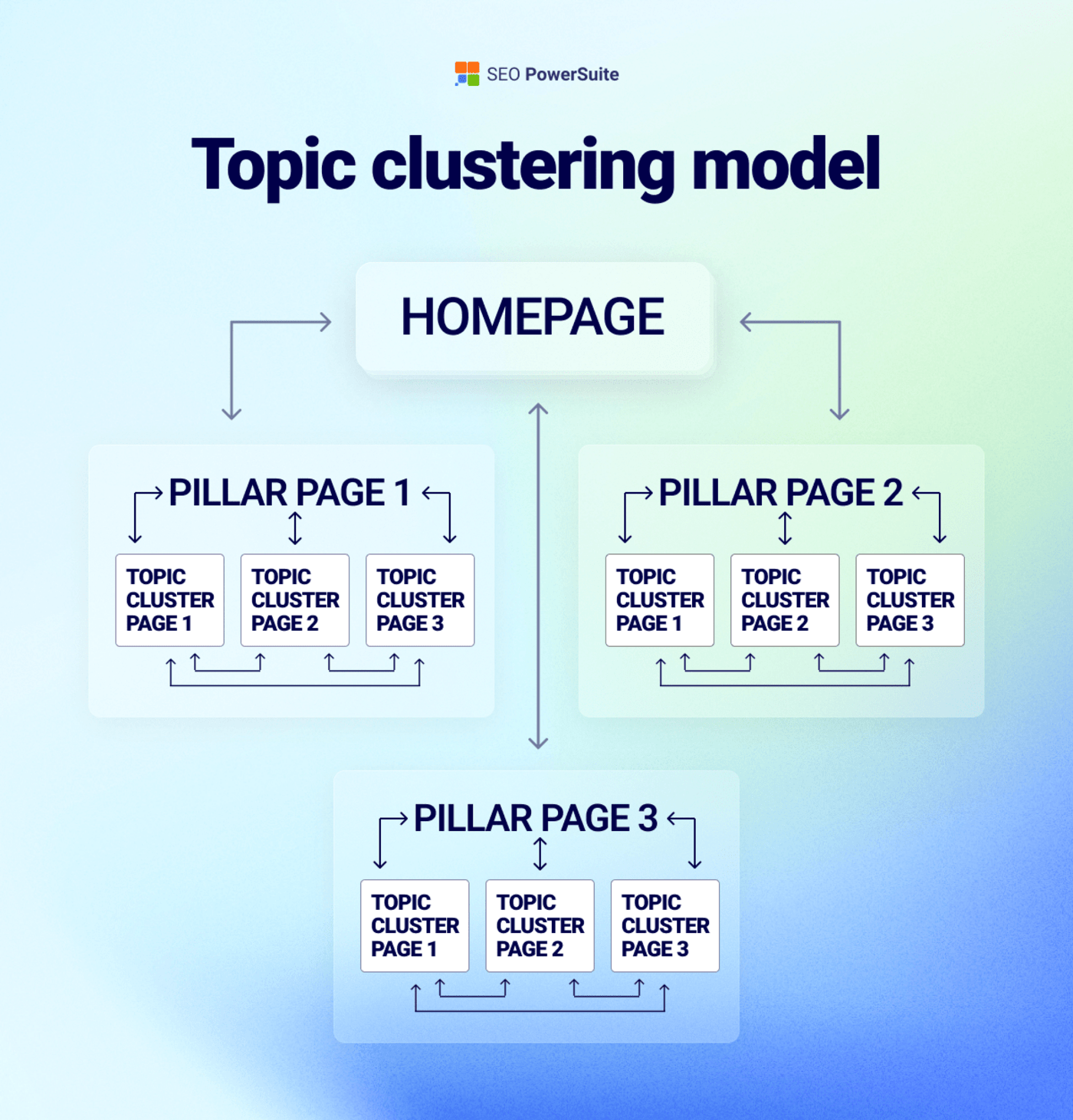
In this approach, the homepage links to “pillar pages” (main topics), and each pillar links to smaller “cluster pages” (detailed posts).
For example, a fitness site may have a “Weight Loss Guide” pillar, with clusters like “how to lose belly fat” and “best fat loss diet.”
All these pages link to each other. This helps users navigate easily and tells Google that your site covers a topic in depth, improving rankings and authority.
Most SEO experts in 2026, including teams at Ahrefs and Semrush, recommend topic clusters over strict silos for this exact reason.
How to Build a Silo Structure in WordPress?
Here’s a step-by-step process to implement silos on your WordPress site.
Step 1: Define your main topics
Before creating a single category, list out the KEY topics your website will cover. These become your silos.
At BloggersPassion, our main topics are SEO, Blogging, Hosting, and Affiliate Marketing. Everything we publish falls under one of these.
Use a tool like Semrush or Ahrefs to find keyword clusters around each topic.
Pro tip: Don’t create a silo for a topic you’ll only write 2 to 3 posts about. You need at least 5 to 10 posts to make a silo worthwhile.
Step 2: Set up categories and subcategories
Go to your WordPress dashboard > Posts > Categories. Create one category for each silo.
If a silo is broad enough, add subcategories. For example, your SEO silo might include subcategories such as Keyword Research, Link Building, and Technical SEO.
But don’t overdo it. Too many subcategories create confusion. Only add them when you have enough content to fill each one.
Step 3: Optimize your URL structure
Go to Settings > Permalinks > Custom Structure and enter:
/%category%/%postname%/
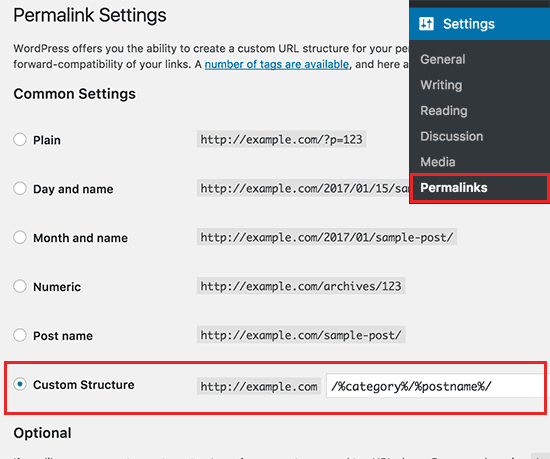
This gives you URLs like:
- yourdomain.com/seo/keyword-research-guide/
- yourdomain.com/email-marketing/best-email-tools/
Google can see the silo right in the URL. That’s a physical silo in action.
If you prefer shorter URLs, you can skip the category and use /%postname%/ only.
Step 4: Add breadcrumbs
Breadcrumbs show your visitor exactly where they are on your site. Like this:
Home > SEO > Keyword Research Guide
They help users navigate back to the category page. And they help Google understand your site hierarchy.
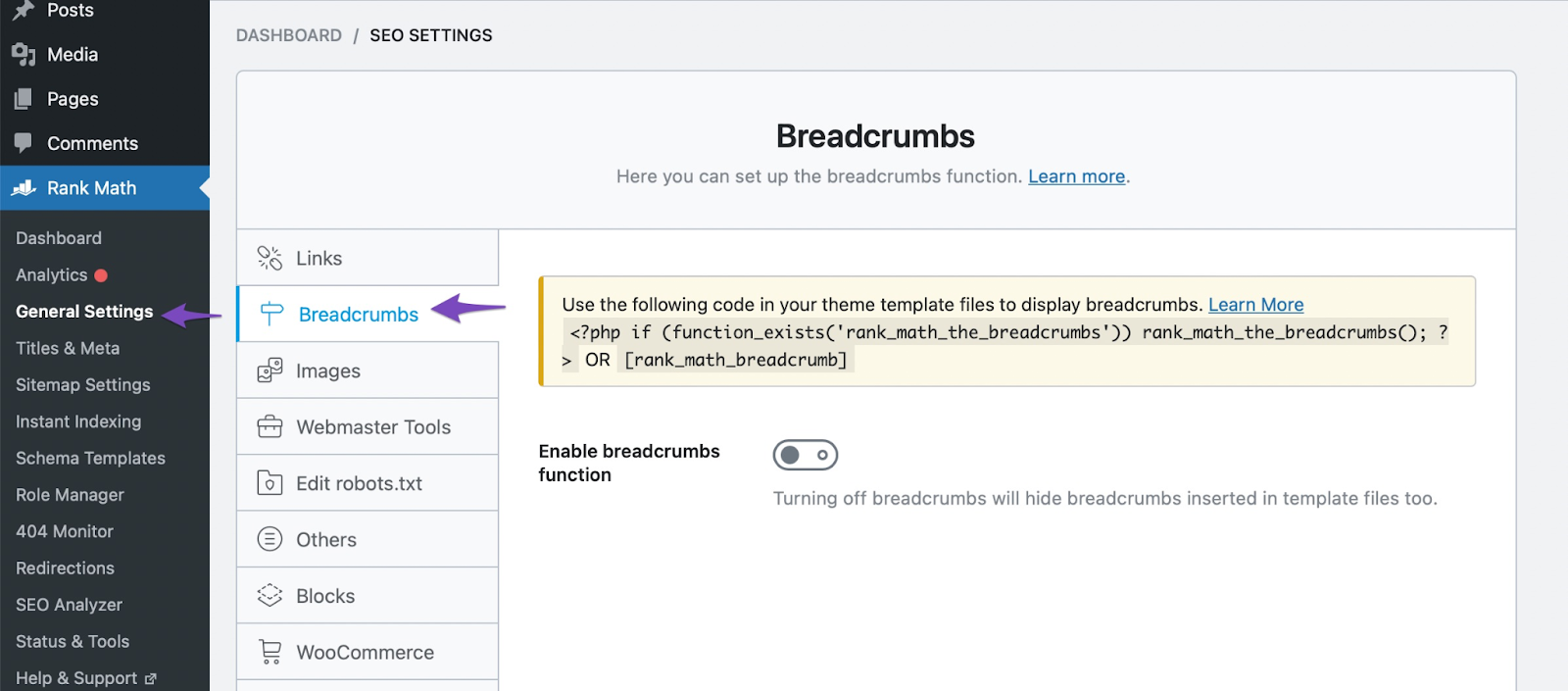
If you’re using Rank Math, breadcrumbs are built in. Just enable them in Rank Math > General Settings > Breadcrumbs.
Step 5: Interlink within each silo
Every post in a silo should link to at least 2 to 3 other posts in the same silo. And every post should link back to the main silo (category) page.
This keeps link juice flowing within the group and boosts topical relevance.
Step 6: Link across silos when it makes sense
If your SEO post mentions email outreach, link to your email marketing guide. If your blogging post mentions keyword research, link to your SEO post.
Don’t block useful links just to keep your silos “pure.” Your readers (and Google) will thank you.
5 Best Practices for Silo SEO in 2026
Here are 5 best practices for building a well-structured silo that boosts rankings and authority.
1. Think pyramid, not silo
Put your most important pages at the top (homepage → category pages → posts). Google’s John Mueller recommends this structure because it helps Google better understand page hierarchy than isolated silos do.
2. Keep important content within 3 clicks
A reader on your homepage should reach any important post in 3 clicks or less.
For example: Homepage → SEO (category page) → Keyword Research Guide. That’s 2 clicks.
If that same post is hidden under Homepage → Blog → SEO → Guides → Keyword Research Guide, that’s 4 clicks. Google sees deep pages as less important and may not prioritize crawling them.
3. One post, one category
Never assign a post to multiple categories. It confuses your silo structure and weakens topical relevance. Pick the single most relevant category for each post.
4. Remove thin content regularly
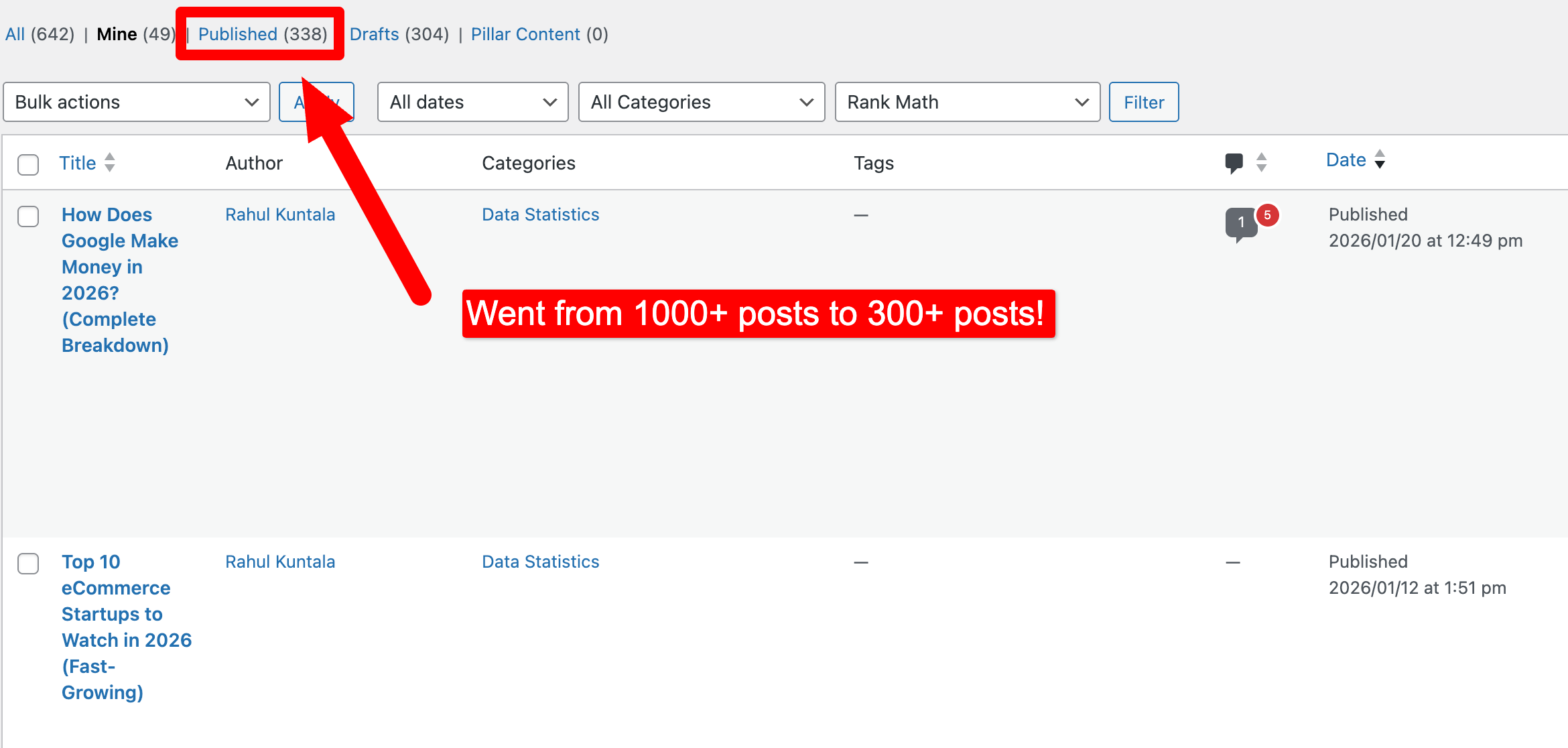
At BloggersPassion, we went from 1000+ published posts to around 300 indexed pages. We removed or redirected every post that wasn’t driving traffic, sales, or conversions. That’s the best way to improve topical authority.
5. Audit your internal links
Use Semrush’s Site Audit or Ahrefs’ Site Audit to find orphan pages, broken links, and pages without any internal links. Fix that issue.
FAQs On Silo Structure SEO
Here’s a list of a few important questions you should know about siloing your website for better SEO in 2026 and beyond.
Silos in SEO are all about dividing your website’s content into various categories and subcategories, and these groupings are known as Silos.
Figure out what topics you want to include on your website so you can perform in-depth keyword research. That way, you can easily divide your website’s content into multiple categories to create powerful silos.
There’s no limit. It’s simply like there’s no limit on the number of categories or pages you want to create on your website. You can create as many silos as you want.
Yes, absolutely. In fact, it’s better to start building backlinks to your Silo pages that you think are really important instead of building links only to your home page.
Yes, you can create sub silos by including subcategories, which you can implement by dividing your blog’s primary categories.
Physical silos (URL-based), virtual silos (linking-based), and hybrid silos (both). Physical silos use a folder structure. Virtual silos use internal linking only. Hybrid combines both for the strongest signal.
Take Action
Don’t overthink this. Start with 3 to 5 main categories for your site.
Organize your existing posts into those categories. Interlink everything within each group.
Have any questions on silos? Let me know in the comments.




![How to do Keyword Research Correctly in 2026 for GEO & SEO (A to Z Tutorial]](webp/how-to-do-keyword-research-like-a-pro-300x157.jpg.webp)




Hi Anil,
This is great guide for beginners and intermediate SEOs. Recently, I started a new blog and I was looking for perfect silo structure guide and I came across this guide.
It's good practice to have to create main pages from the beginning and then supportive pages interlink to main pages. This way we can pass good link juice to around one topic. What do you say?
Regards,
Aakash